 Qisthi Ramadhani
 In the last article, we successfully set up a high-performance development environment with Laravel Octane and Sail. Now that our engine is warmed up, it’s time to explore some of the most transformative features that Swoole brings to the table: concurrency and asynchronous workflows.
📚 Series Navigation: This is Part 3 of the Laravel Octane Mastery series.
These concepts might sound complex, but they are the key to unlocking a new level of performance and responsiveness in your applications. Let’s break them down.
Embracing Concurrency in PHP
Traditionally, PHP operates in a single-threaded, blocking manner. Imagine a single-lane road: only one car can pass at a time. If one car stops (a slow I/O operation like a database query or an API call), all the cars behind it have to wait. This is how standard PHP-FPM works; it handles one request at a time, and if that request is slow, it blocks the worker.
Swoole changes this by introducing an event-driven, asynchronous model. It’s like turning that single-lane road into a multi-lane highway. Multiple tasks can run in parallel without blocking each other, which is a total game-changer for PHP developers.
Setting the Stage: Creating Our events Table
To demonstrate these concepts with a practical, hands-on example, we first need some data to work with. We’ll create an events table and populate it with a large amount of fake data. This will allow us to simulate real-world scenarios where performance matters.
Step 1: Create the Model, Migration, and Seeder
Laravel’s Artisan console makes this easy. Run the following command to generate the model, migration, and seeder files for our Event model all at once:
# If using Sail, remember to prefix with./vendor/bin/sail
./vendor/bin/sail php artisan make:model Event -ms
This command creates three new files :
- app/Models/Event.php (the Eloquent model)
- *create_events_table.php (the database migration)
- database/seeders/EventSeeder.php (the seeder class)

Step 2: Define the events Table Schema
Open the newly created migration file in your database/migrations directory. We’ll define the structure of our events table inside the up() method. We need fields for a user association, an event type, a description, a value, and a date.
// In your create_events_table.php migration file

public function up()
{
    Schema::create('events', function (Blueprint $table) {
        $table->id();
        $table->foreignIdFor(App\Models\User::class)->index();
        $table->string('type', 30);
        $table->string('description', 250);
        $table->integer('value');
        $table->dateTime('date');
        $table->timestamps();
    });
}
Step 3: Seed the Database with Fake Data
To properly test performance, we need a lot of data. We’ll create 1,000 users and 100,000 events.
First, let’s create a UserSeeder to generate our users. Create a new file at database/seeders/UserSeeder.php:
touch database/seeders/UserSeeder.php<?php // database/seeders/UserSeeder.php
namespace Database\Seeders;
use App\Models\User;
use Illuminate\Database\Seeder;
use Illuminate\Support\Facades\Hash;
class UserSeeder extends Seeder
{
/**
* Run the database seeds.
*/
public function run(): void
{
$data = [];
$passwordEnc = Hash::make('password'); // Use a single hashed password for speed
for ($i = 0; $i < 1_000; $i++) {
$data[] = [
'name' => fake()->name(),
'email' => fake()->unique()->email(),
'password' => $passwordEnc,
];
}
// Insert data in chunks to improve performance
foreach (array_chunk($data, 100) as $chunk) {
User::insert($chunk);
}
}
}Next, update the EventSeeder.php file that we generated earlier. This will create 100,000 events linked to our users.
<?php // database/seeders/EventSeeder.php

namespace Database\Seeders;

use App\Models\Event;
use Illuminate\Database\Seeder;

class EventSeeder extends Seeder
{
    /**
     * Run the database seeds.
     */
    public function run(): void
    {
        $data = [];
        for ($i = 0; $i < 100_000; $i++) {
            $data[] = [
                'user_id' => random_int(1, 1_000), // Assuming we have 1_000 users with auto-incrementing IDs
                'description' => fake()->realText(),
                'value' => random_int(1, 10),
                'date' => fake()->dateTimeThisYear(),
                'type' => array_rand(['ALERT', 'WARNING', 'INFO']),
            ];
        }

        // Chunking is essential for large datasets to avoid memory issues
        foreach (array_chunk($data, 500) as $chunk) {
            Event::insert($chunk);
        }
    }
}
Finally, open database/seeders/DatabaseSeeder.php and call your new seeders from the run() method:
// database/seeders/DatabaseSeeder.php

public function run(): void
{
    $this->call([
        UserSeeder::class,
        EventSeeder::class,
    ]);
}
Step 4: Run the Migrations and Seeders
Now, execute the migrations and seeders. The migrate:fresh command is useful here as it will drop all existing tables and re-run all migrations from scratch.
./vendor/bin/sail php artisan migrate:fresh --seedThis process might take a minute, but once it’s done, you’ll have a database full of test data, ready for our performance experiments!
The Power of Octane::concurrently()
One of the most powerful features Octane provides, thanks to Swoole, is the Octane::concurrently() method. This feature is exclusive to the Swoole server and is not available when using RoadRunner. It allows you to take a set of I/O-bound tasks and execute them all at the same time, drastically reducing the total wait time.
Practical Example: Concurrent Dashboard Data Fetching
Let’s use our newly created events table. Imagine our application has a dashboard that needs to display several pieces of data: the total event count, and the last five events for INFO, WARNING, and ALERT types.
To make the performance difference obvious, let’s first add a query scope to our Event model that simulates a slow query by pausing for one second.
<?php // app/Models/Event.php

namespace App\Models;

use Illuminate\Database\Eloquent\Model;
use Illuminate\Contracts\Database\Eloquent\Builder;
use Illuminate\Database\Eloquent\Factories\HasFactory;

class Event extends Model
{
    use HasFactory;

    /**
     * This simulates a complex, time-consuming query.
     */
    public function scopeOfType(Builder $query, string $type)
    {
        sleep(1); // Simulate a 1-second query time
        return $query->where('type', $type)
            ->orderBy('date', 'desc')
            ->limit(5);
    }
}
Now, let’s create a DashboardController to fetch this data.
./vendor/bin/sail php artisan make:controller ShowSequentialDashboardController --invokable
./vendor/bin/sail php artisan make:controller ShowConcurrentDashboardController --invokable
The Sequential Way (Without Concurrency):
In DashboardController.php, let’s create a method that fetches the data sequentially.
<?php // app/Http/Controllers/ShowSequentialDashboardController.php

namespace App\Http\Controllers;

use App\Models\Event;

class ShowSequentialDashboardController extends Controller
{
    /**
     * Handle the incoming request.
     */
    public function __invoke()
    {
        $time = hrtime(true);

        Event::query()->count();
        Event::query()->ofType('INFO')->get();
        Event::query()->ofType('WARNING')->get();
        Event::query()->ofType('ALERT')->get();

        $time = (hrtime(true) - $time) / 1_000_000; // time in ms

        // Total time will be > 3 seconds (3 queries * 1 second sleep)
        return "Fetched sequentially in {$time}ms";
    }
}
The Concurrent Way (With Octane::concurrently()):
Now, let’s create another method that uses Octane::concurrently() to run the same queries in parallel.
<?php // app/Http/Controllers/ShowConcurrentDashboardController.php

namespace App\Http\Controllers;

use App\Models\Event;
use Illuminate\Http\Request;
use Laravel\Octane\Facades\Octane;
use Laravel\Octane\Exceptions\TaskTimeoutException;

class ShowConcurrentDashboardController extends Controller
{
    /**
     * Handle the incoming request.
     */
    public function __invoke(Request $request)
    {
        $time = hrtime(true);

        try {
            [$count, $eventsInfo, $eventsWarning, $eventsAlert] = Octane::concurrently([
                fn() => Event::query()->count(),
                fn() => Event::query()->ofType('INFO')->get(),
                fn() => Event::query()->ofType('WARNING')->get(),
                fn() => Event::query()->ofType('ALERT')->get(),
            ]);
        } catch (TaskTimeoutException $e) {
            return "Error: A task timed out.";
        }

        $time = (hrtime(true) - $time) / 1_000_000; // time in ms

        // Total time will be the time of the SLOWEST query, ~1 second
        return "Fetched concurrently in {$time}ms";
    }
}
Finally, add the routes in routes/web.php:
<?php // routes/web.php

use App\Http\Controllers\ShowConcurrentDashboardController;
use App\Http\Controllers\ShowSequentialDashboardController;
use Illuminate\Support\Facades\Route;
use Livewire\Volt\Volt;

Route::get('/dashboard-sequential', ShowSequentialDashboardController::class)
    ->name('dashboard.sequential');
Route::get('/dashboard-concurrent', ShowConcurrentDashboardController::class)
    ->name('dashboard.concurrent');

// Others routes...
Validate the code by running the following command to ensure everything is set up correctly:
./vendor/bin/sail php artisan route:list --name=dashboard
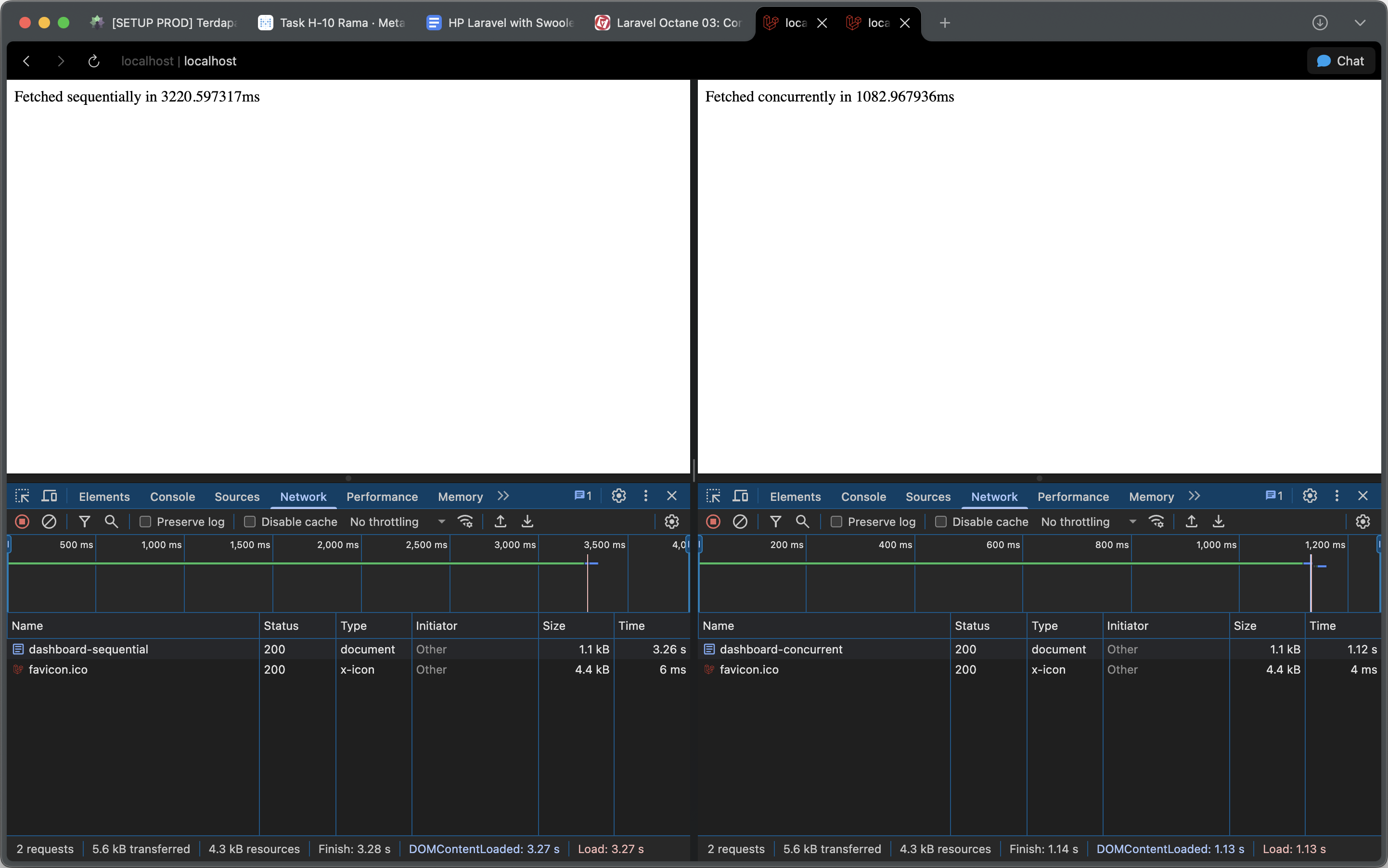
When you visit /dashboard-sequential, the response will take over 3 seconds. But when you visit /dashboard-concurrent, it will take only about 1 second. The performance gain is massive!
Asynchronous Workflows with Laravel Queues
So, if Octane::concurrently() is for running things at the same time, what are Laravel Queues for? This is a critical distinction.
- Use Octane::concurrently() for short-lived, I/O-bound tasks that are part of a single request-response cycle. The user is actively waiting for the results to load the page. The goal is to make that specific request faster.
- Use Laravel Queues for long-running, resource-intensive, or non-critical tasks that should happen completely outside of the request-response cycle. The user gets an immediate response, and the heavy work happens in the background.
Think of sending a welcome email after registration, processing a large uploaded file, or generating a complex report. You don’t want the user to wait for these tasks to finish. Instead, you dispatch a job to a queue.
Why Redis for Queues?
While you can use your database as a queue driver, Redis is highly recommended for production environments for two main reasons:
- Performance: Redis is an in-memory data store, which makes it significantly faster for the rapid read/write operations that queues require.
- Laravel Horizon: To use Laravel’s beautiful queue monitoring dashboard, Horizon, you must use the Redis queue driver.
Batching Large Operations for Junior Devs
What if you need to process all 100,000 events in our table? Loading them all with Event::all() will crash your server. This is where chunking comes in—a divide and conquer strategy for large datasets.
- Eloquent Chunking (chunkById()): When working with database records,
chunkById()is the safest method. It retrieves records in batches (e.g., 200 at a time) and uses the primary key to paginate. This prevents records from being skipped or processed twice if the underlying data is modified during the operation.
use App\Models\Event;

Event::chunkById(200, function ($events) {
    foreach ($events as $event) {
        // Process 200 events at a time
    }
});- Lazy Collections: For maximum memory efficiency, LazyCollection is your best friend. It uses PHP generators to iterate over a massive dataset while only ever holding a single item in memory at a time.
use App\Models\Event;

foreach (Event::lazy() as $event) {
    // Process one event at a time, with minimal memory usage
}- Job Batching: For the ultimate in robust, scalable processing, you can combine these techniques with Laravel’s Job Batching. You can iterate over a LazyCollection and dispatch a job for each chunk of data. This distributes the work across your queue workers and allows you to monitor the entire batch’s progress and handle completion or failure events.
use App\Jobs\ProcessEventChunk;
use Illuminate\Support\Facades\Bus;

$batch = Bus::batch()->dispatch();

foreach (Event::lazy()->chunk(1000) as $chunk) {
    $batch->add(new ProcessEventChunk($chunk));
}
What’s Next?
We’ve covered some serious ground, moving from simple speed boosts to fundamentally new ways of structuring our application’s logic. We’ve seen how to use Octane::concurrently() for instant in-request performance gains and how to use queues and batching for robust, scalable background processing.
Continue the Journey: Ready to master the most advanced optimization techniques? In Part 4: Advanced Caching and Database Optimization, we’ll explore Swoole’s powerful caching features and essential database optimizations for production-ready applications.
In the next article, we’ll dive into another powerful Swoole-specific feature: the Octane Cache. We’ll also cover essential database optimizations and how to monitor our new high-performance application.
Works cited
- Laravel Octane vs. PHP-FPM: A Deep Dive into Modern PHP Performance, accessed July 13, 2025, https://dev.to/arasosman/laravel-octane-vs-php-fpm-a-deep-dive-into-modern-php-performance-4lf7
- Autoscale nginx and php-fpm independently on Kubernetes - marekbartik.com | tech blog, accessed July 13, 2025, https://blog.marekbartik.com/posts/2018-03-24_autoscale-nginx-and-phpfpm-independently-on-google-kubernetes-engine/
- High Performance with Laravel Octane - Roberto Butti, accessed July 13, 2025, https://subscription.packtpub.com
- A simple explanation about concurrency with Laravel Octane - DEV Community, accessed July 13, 2025, https://dev.to/marcoaacoliveira/a-simple-explanation-about-concurrency-with-laravel-octane-5d5h
- Queues - Laravel 12.x - The PHP Framework For Web Artisans, accessed July 13, 2025, https://laravel.com/docs/12.x/queues
- Mastering Background Job Processing with Supervisor and Laravel Queues, accessed July 13, 2025, https://dev.to/asifzcpe/mastering-background-job-processing-with-supervisor-and-laravel-queues-1onb